Quick Answer
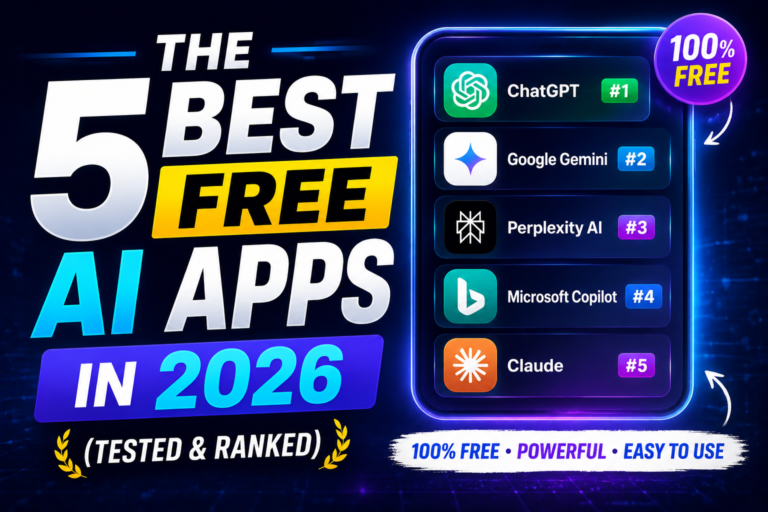
The five best free AI apps in 2026 are ChatGPT (best all-rounder), Google Gemini (best for Google integration), Claude (best for reasoning and coding), Perplexity AI (best for cited research), and DeepSeek (best unlimited free usage). ChatGPT leads with 46.4% market share, followed by Gemini at 27.7% and Claude at 10.3%. Each offers a genuinely useful free tier with different strengths and limits.
Key Takeaways
- ChatGPT offers unlimited GPT-5.2 Instant messages with 5 Thinking messages every 5 hours, plus voice mode and 3 daily image generations.
- Google Gemini provides unlimited Gemini 3 Flash messages, 5 Deep Research reports monthly, 10 image generations daily, and seamless Workspace integration.
- Claude delivers ~40-45 Sonnet 4.6 messages every 5 hours with a ~200K token context window, web search, file uploads, and Artifacts feature.
- Perplexity AI gives unlimited cited Quick Searches plus 5 Pro Searches and 3 Deep Research reports daily—ideal for students and researchers.
- DeepSeek offers completely unlimited free access to DeepSeek V4 and R1 reasoning models with file uploads and web search.
Introduction
Three years ago, free AI tools were little more than tech demos. In 2026, that has completely changed. The best free AI apps now deliver genuinely useful capabilities that millions rely on daily for writing, coding, research, and creative work.
ChatGPT reached 1 billion monthly active users faster than any app in history. But the market is shifting: ChatGPT’s share has dipped below 50% for the first time as competitors like Gemini and Claude gain serious ground. The competition has made free tiers better than ever.
The real question isn’t “which AI is the best?”—it’s “which of the best free AI apps fits what I actually need?”
Some excel at deep reasoning and coding. Others shine at research with citations. Some integrate seamlessly with your existing workflow, while others offer unlimited usage without caps.
This guide answers that question with data, benchmarks, and hands-on testing. You’ll learn exactly what each app offers, where it falls short, and which one is right for you—whether you’re a student, developer, writer, researcher, or business professional.
What Are Free AI Apps?

Free AI apps are artificial intelligence applications that offer functional capabilities without requiring a paid subscription. These include AI chatbots, AI-powered search engines, writing assistants, coding tools, and image generators that you can use at no cost.
Free AI apps typically operate on a freemium model—you get core features for free, with optional paid upgrades for advanced capabilities, higher usage limits, or priority access. The best free AI apps provide genuinely useful functionality that can handle a significant portion of everyday tasks.
Who uses them?
- Students – for research, homework help, and learning assistance
- Developers – for coding help, debugging, and documentation
- Writers – for brainstorming, editing, and content drafting
- Researchers – for gathering cited information and analysis
- Business professionals – for drafting emails, summarizing meetings, and productivity tasks
- Casual users – for everyday questions, creative projects, and entertainment
When are free AI apps useful?
- When you need quick answers or research assistance
- When you want to try AI capabilities before committing to a paid plan
- When your usage is moderate and fits within free tier limits
- When you’re a student or on a tight budget
- When you need specialized capabilities
Why Free AI Apps Matter in 2026
Free AI apps have become essential tools in the modern digital landscape.
1. Accessibility and Democratization of AI
The best free AI apps put advanced artificial intelligence in the hands of anyone with an internet connection. Students in developing countries, independent developers, and small business owners can now access capabilities that were previously reserved for large enterprises with deep pockets.
2. Competitive Market Driving Innovation
The intense competition among AI providers has forced constant improvements. Each new release pushes the boundaries of what’s possible—and free tiers benefit from these advancements. When one company adds a feature, others quickly follow.
3. Ecosystem Lock-in
Companies offer generous free tiers to build user habits and gather data. Once you’re comfortable with a specific AI assistant, you’re more likely to pay for premium features when you need them. This dynamic keeps the market vibrant and free tiers robust.
4. AI Literacy and Skill Building
Free access allows people to learn how AI works, experiment with prompts, and build AI skills without financial risk. This is crucial for workforce development and keeping pace with technological change.
5. Productivity Gains
Even with limits, free AI apps can save hours of work each week. Writers overcome creative blocks. Developers debug faster. Students research more efficiently. The cumulative productivity boost across millions of users is enormous.
Current Market Trends (2026):
| Metric | Value |
|---|---|
| ChatGPT Market Share | 46.4% |
| Gemini Market Share | 27.7% |
| Claude Market Share | 10.3% |
| ChatGPT Monthly Active Users | ~1.1 billion |
| Free Tier Availability | All major AI apps offer free tiers |
| Ads Introduction | ChatGPT began showing ads (Feb 2026) |
The 5 Best Free AI Apps in 2026
1. ChatGPT – Best All-Rounder
Developer: OpenAI | Market Share: 46.4%
Free Model: GPT-5.2 Instant (unlimited), GPT-5.2 Thinking (capped)
ChatGPT remains the most versatile among the best free AI apps. The free tier gives you unlimited GPT-5.2 Instant messages for general chat, drafting, and short code review. For deep reasoning tasks like math, multi-step planning, or long refactors, you get 5 messages on GPT-5.2 Thinking every 5 hours.
You also get 3 image generations per day, voice mode, file uploads up to 10MB, web browsing, and access to public Custom GPTs. The voice mode handles interruptions naturally and is what most people now use it for on mobile.
ChatGPT’s mobile app is the most polished in the category. Voice mode and camera input are killer features—point it at a menu, a wiring diagram, or a math problem, and get an instant explanation.
What it does best: General-purpose tasks, business writing, brainstorming, and creative work.
Free tier limitations: Only 5 “Thinking” messages per 5-hour window for complex tasks. US users see ads on the free tier as of 2026.
Good for: Anyone who needs a reliable AI assistant for varied daily tasks.
Not ideal for: Heavy reasoning users who hit the Thinking cap frequently.
2. Google Gemini – Best for Google Users
Developer: Google | Market Share: 27.7%
Free Model: Gemini 3 Flash (unlimited), Gemini 3 Pro (capped)
Gemini has grown faster than any other AI assistant, driven by deep integration across Gmail, Drive, Docs, Sheets, and Calendar. The free tier ships with Gemini 3 Flash (unlimited messages) and a daily quota on Gemini 3 Pro.
What changed in 2026: free users now get Deep Research (5 reports per month), Canvas, and Veo 3 Fast video generation (about 3 short clips per day). Image generation runs on Imagen 4 with a daily cap of 10.
Where Gemini wins is Workspace integration. Ask “summarize the threads from Acme in the last two weeks” and it reads your Gmail. “Draft a doc from these notes” lands in Drive. No copy-paste step. On Android, Gemini has replaced Google Assistant, making it one long-press of the power button away.
What it does best: Google ecosystem integration, multimodal analysis (text, images, video), and workspace productivity.
Free tier limitations: Flash occasionally makes confident factual errors. 10 image generations/day cap. Deep Research limited to 5 reports/month.
Good for: Gmail, Drive, and Calendar users who want AI built into their workflow.
Not ideal for: Users who need high accuracy on factual claims without cross-checking.
3. Claude – Best for Deep Reasoning & Coding
Developer: Anthropic | Market Share: 10.3%
Free Model: Claude Sonnet 4.6 (~40-45 messages/5 hours)
Claude has built a strong reputation for careful reasoning and is closing in on ChatGPT’s user-retention rate. The free tier gives you about 40-45 messages every 5 hours on Sonnet 4.6, with a generous context window for long documents.
Free Claude includes web search, file uploads (PDFs, DOCX, images, code), artifacts, and memory across chats. The Artifacts feature creates separate workspaces for code and documents, making Claude one of the best free AI apps for technical work and long-form writing.
The mobile app added Projects in March 2026—keep a Project for a specific client, drop in their brand guidelines and past emails, and every message has that context loaded. Claude is notably honest about its limits and produces fewer hallucinations than competitors.
What it does best: Careful reasoning, long-form writing, coding, and document analysis.
Free tier limitations: ~40-45 messages per 5-hour window. No image generation capability.
Good for: Writers, developers, and anyone analyzing lengthy documents.
Not ideal for: Users who need image generation or heavy daily voice use.
4. Perplexity AI – Best for Research
Developer: Perplexity | Market Share: Below 5%
Free Model: Unlimited Quick Searches, 5 Pro Searches/day
Perplexity is different from other best free AI apps—it’s an AI-powered search engine that delivers cited answers instead of just links. The free tier includes unlimited Quick Searches (fast, cited answers) and 5 Pro Searches per day. Pro runs a multi-step pass and produces a longer synthesized answer.
You also get 3 Deep Research reports per day on free now (up from 1 before March 2026). Deep Research is the killer feature: ask a question, walk away, get a 5-10 page report with sources. It’s the best option for research where source verification matters.
On mobile, you can set Perplexity as your Safari default search engine and get cited AI answers every time you’d normally Google something.
What it does best: Research with citations, fact-checking, and real-time information gathering.
Free tier limitations: 5 Pro Searches/day, 3 Deep Research reports/day. No model choice.
Good for: Students, researchers, journalists, and fact-checkers.
Not ideal for: Creative writing or long-form content generation.
5. DeepSeek – Best Unlimited Free AI
Developer: DeepSeek | Market Share: Below 5%
Free Model: DeepSeek V4 (unlimited), R1 reasoning (unlimited)
DeepSeek stands out among the best free AI apps because it offers essentially unlimited free access. Web chat is free with no daily message limit, and you can toggle between DeepSeek V4 (general, fast) and R1 reasoning (chain-of-thought, slower, excellent on math and code).
R1 exposes its thinking step by step, which is helpful for debugging logic errors and learning how a model approaches a problem. On hard coding tasks, R1 is comparable to GPT-5.2 Thinking and occasionally better at math.
File uploads work (PDFs, code files, images). Web search is included.
What it does best: Heavy reasoning, math, and coding with no usage caps.
Free tier limitations: China-origin may raise compliance concerns for some employers. Minimal ecosystem compared to the top three.
Good for: Students, developers, and anyone needing unlimited free AI.
Not ideal for: Enterprise users with compliance concerns or those needing extensive third-party integrations.
Comparison Table

How to Choose the Best Free AI App for You
Choose ChatGPT if: You want the most versatile option with the largest ecosystem. The voice interface and camera input add real value for everyday use.
Choose Gemini if: You’re deeply embedded in Google Workspace. Pulling data from Gmail and Drive makes it a productivity multiplier.
Choose Claude if: Your work involves long documents, complex reasoning, or coding. The context window and Artifacts feature are unmatched.
Choose Perplexity if: You need credible, cited answers for research. Nothing else comes close for verifiable information.
Choose DeepSeek if: You need unlimited free AI without worrying about hitting caps. Great for students and developers on a budget.
Step-by-Step Guide: Getting Started
Step 1: Identify Your Primary Need
Before choosing from the best free AI apps, define what you’ll use AI for most often:
- Research and fact-checking? → Perplexity AI
- Google integration? → Gemini
- Long documents and careful reasoning? → Claude
- Versatility with voice and images? → ChatGPT
- Unlimited usage on a budget? → DeepSeek
Step 2: Create Accounts
Most free AI apps require account creation. Here’s what to expect:
- ChatGPT – Email sign-up, phone verification optional
- Gemini – Google account needed (you likely already have one)
- Claude – Email sign-up, SMS verification
- Perplexity – Email sign-up or Google login
- DeepSeek – Email sign-up, SMS verification
Pro Tip: Use the same email across platforms to track which you’re using most.
Step 3: Test Core Capabilities
Try each app with tasks relevant to your needs:
- Ask a complex question that requires reasoning
- Upload a document and ask for analysis
- Request a writing draft or outline
- Ask for coding help (if relevant)
- Check their research capabilities
Step 4: Learn the Interface
Each free AI app has its own workflow:
- ChatGPT: Main chat with model selector, file upload button, voice button
- Gemini: Integrated with Google apps, Deep Research mode, Canvas
- Claude: Projects for organizational contexts, Artifacts for code
- Perplexity: Quick Search, Pro Search, Deep Research
- DeepSeek: Toggle between V4 and R1 models, web search toggle
Step 5: Check Usage Limits
Your account will show remaining usage. Learn these patterns to avoid interruptions:
- ChatGPT: 5 Thinking messages per 5 hours
- Gemini: 5 Deep Research reports per month
- Claude: ~40-45 messages per 5 hours
- Perplexity: 5 Pro Searches, 3 Deep Research per day
- DeepSeek: No caps reported
Step 6: Build Your Workflow
Combine multiple free AI apps for a complete free stack:
- Research phase: Perplexity Deep Research for overview, use sources in NotebookLM
- Writing phase: Claude for draft (strong reasoning), ChatGPT for variations
- Coding phase: DeepSeek R1 for hard problems, ChatGPT for quick checks
- Visuals: Copilot Designer for everyday images, Gemini for polished work
Real-World Examples
Example 1: Student Research Project
Sarah is a university student writing a research paper on climate policy. Her workflow:
- Perplexity Deep Research – “Climate policy effectiveness in EU vs US” → 8-page report with 20+ cited sources
- Claude – Uploads the report and asks for outline and key arguments
- ChatGPT – Asks for headline variations and introduction drafts
- Gemini – Checks facts and suggests academic sources
Total cost: $0. Quality of work: comparable to using paid tools.
Example 2: Startup Developer
Rahul is building a SaaS product solo. His daily free AI workflow:
- DeepSeek R1 – Debugs complex payment integration logic
- ChatGPT – Writes quick API endpoint templates
- Claude – Reviews code for security issues
- Perplexity – Researches new tech stack options
He saves 10-15 hours per week using AI tools—all free.
Example 3: Marketing Manager
Maya manages content for a mid-sized company. Her AI workflow:
- Claude – Drafts long-form blog posts and whitepapers
- ChatGPT – Brainstorms social captions and multiple headline variations
- Gemini – Creates visual concepts for content
- Perplexity – Gathers competitor intelligence
Content output increased 2x without additional cost.
Best Practices for Using Free AI Apps

1. Stack Multiple Free Apps
No single free AI app does everything. Use ChatGPT for voice and images, Claude for reasoning and documents, Perplexity for research, and DeepSeek for unlimited heavy lifting.
2. Learn Each App’s Unique Strengths
- ChatGPT: Voice interaction, brainstorming, creative writing
- Gemini: Google Workspace, video analysis, research reports
- Claude: Long documents, reasoning, coding
- Perplexity: Cited research, fact-checking
- DeepSeek: Math, unlimited reasoning
3. Monitor Your Usage
Know your limits and plan accordingly. If you’re approaching a cap, switch to another app.
4. Use the Right Model for the Task
- Quick answers: Use flash/general models
- Complex reasoning: Use thinking/reasoning models
- Research: Use Deep Research or Pro Search
5. Fine-Tune Prompting
Better prompts get better results. Be specific about your needs, format, and expected output.
6. Verify Critical Information
Even the best free AI apps make mistakes. Cross-check important facts, especially with Perplexity’s citations.
7. Keep Privacy in Mind
Don’t share sensitive personal or business information with free AI apps. Review each app’s privacy policy.
8. Stay Updated on Changes
Free tiers change. New features appear, limits adjust, and sometimes ads appear. Follow official announcements.
9. Use Mobile Apps
Voice input and camera features are often better on mobile. Download the apps for the best experience.
10. Build Templates
Save effective prompts as templates for repeated tasks. This saves time and improves consistency.
Common Mistakes to Avoid
1. Using Only One AI App
Relying on a single free AI app means hitting limits quickly and missing out on specialized strengths. Most users should have 2-3 free accounts.
2. Ignoring Privacy and Security
Free AI apps retain conversation data. Don’t share passwords, proprietary code, financial details, or confidential business information.
3. Treating AI Answers as Absolute Truth
AI models hallucinate—they make up plausible-sounding false information. Always verify, especially for research and medical/financial advice.
4. Not Understanding Limits
Many users get frustrated because they don’t know their usage limits. Check your account dashboard and plan accordingly.
5. Using the Wrong Model
Using a thinking/reasoning model for a simple question wastes your limited quota. Use flash models for everyday queries.
6. Poor Prompting
Vague prompts get vague answers. Be specific about what you want, how you want it formatted, and any constraints.
7. Forgetting to Update
Features change rapidly. Old advice may be outdated. Check official documentation for current capabilities.
8. Using AI for Final Drafts Without Editing
AI-generated content often needs human editing. Don’t publish AI-generated text without review.
9. Over-Reliance on Image Generation
Free tier image generation is limited and often watermarked. Use it for concepts, not final deliverables.
10. Not Taking Advantage of Deep Research
Deep Research features (Gemini, Perplexity) are powerful but often underutilized. Use them for serious work.
Expert Tips
Tip 1: Stack Free Apps Strategically
My zero-cost workflow for 2026: Perplexity Deep Research for initial work, Claude for long-form writing, ChatGPT for creativity and voice, DeepSeek for heavy reasoning. This covers 90% of paid use cases.
Tip 2: Learn Prompt Engineering for Free
Free apps are sensitive to prompting. Learn basic prompt engineering—specificity, format instructions, constraints—to get better results without paying.
Tip 3: Use NotebookLM as a Research Companion
Combine Perplexity research with Google’s NotebookLM (free) for deeper analysis of source documents.
Tip 4: Set Expectations on Free Tier Quality
Free tier models are often slightly older or smaller than paid versions. They’re still excellent, but don’t expect the absolute latest capabilities.
Tip 5: Use AI for Learning, Not Just Getting Answers
Use the reasoning modes (ChatGPT Thinking, DeepSeek R1, Claude’s reasoning) to understand how AI approaches problems. It’s a learning tool.
Tip 6: Keep a Prompt Log
Save effective prompts in a document. Build your personal prompt library over time.
Tip 7: Use Incognito Mode for Sensitive Queries
If privacy concerns you, use incognito or guest modes for sensitive questions. Clear chat histories regularly.
Tip 8: Watch for New Features
AI apps add features quarterly. Set Google Alerts or follow official blogs for updates.
Tip 9: Use AI for Personal Projects
Free AI apps are excellent for personal learning, side projects, and hobbies. Use them to upskill and explore new areas.
Tip 10: Provide Feedback
Most AI apps have feedback mechanisms. Use them! Your feedback improves the models for everyone.
Frequently Asked Questions
1. Which is the best free AI app overall in 2026?
ChatGPT remains the best all-rounder due to its versatile capabilities, polished interface, voice mode, and image generation. However, “best” depends on your needs—Claude for reasoning, Perplexity for research, Gemini for Google integration.
2. Which free AI is best for coding?
Claude and DeepSeek are the strongest free options. Claude’s Artifacts feature creates dedicated workspaces for code, while DeepSeek offers unlimited usage with strong reasoning capabilities. ChatGPT is also good for quick syntax checks.
3. Is ChatGPT still free in 2026?
Yes. ChatGPT Free provides unlimited GPT-5.2 Instant messages and 5 GPT-5.2 Thinking messages every 5 hours. However, US users now see ads on the free tier as of February 2026.
4. Which AI is completely free with no limits?
DeepSeek is the most generous among major AI apps—truly unlimited messaging with no known caps. Some open-source options via HuggingChat also offer unrestricted use.
5. Which free AI has the largest context window?
Claude leads with ~200K tokens on the free tier, enough to process entire books. DeepSeek claims up to 1M tokens. ChatGPT and Gemini offer about 32K tokens.
6. Which free AI is best for research?
Perplexity AI is the best for cited research with its Deep Research feature (3 free reports per day). Gemini also offers 5 Deep Research reports per month on the free tier.
7. Does ChatGPT have ads on the free tier?
Yes, ChatGPT began showing ads to US free tier users in February 2026. Gemini and Claude do not currently show ads on their free tiers.
8. Which AI has the highest customer satisfaction?
According to the American Customer Satisfaction Index’s inaugural AI survey in 2026, Google Gemini scored highest at 76/100, followed by Microsoft Copilot at 74, with ChatGPT and Claude tied at 73.
9. Which free AI is best for students?
Perplexity AI (for research with citations), ChatGPT (versatile and easy to use), and DeepSeek (unlimited free reasoning) are all excellent for students. The best depends on their primary need.
10. Which free AI is best for writing?
Claude excels at long-form writing with its generous context window and reasoning capabilities. ChatGPT is excellent for shorter pieces, brainstorming, and creative writing.
11. Which free AI is best for image generation?
ChatGPT (3 images/day) and Gemini (10 images/day) both offer image generation on free tiers. For more images without paying, use Microsoft Copilot Designer (15 images/day, no watermark).
12. Can I use free AI for business?
Yes, but be mindful of privacy and data usage. Don’t share proprietary information. For business use, consider the paid tiers with better data protection or use enterprise versions.
13. Do free AI apps support voice input?
ChatGPT and Gemini have excellent voice modes on mobile. Claude has limited voice support. Perplexity and DeepSeek do not currently support voice input on free tiers.
14. Which free AI is best for non-English users?
All major free AI apps support multiple languages. ChatGPT and Gemini have the best language coverage. Perplexity is strong for web search across languages. DeepSeek is particularly good for Asian languages.
15. What’s the best strategy for using free AI apps?
The smartest strategy is to use multiple free apps. Keep accounts on your top two or three options and switch between them based on task type and usage limits. This approach costs nothing and covers 90% of what most people pay for.
Conclusion
The AI landscape in 2026 is genuinely competitive, and users are the clear winners. ChatGPT still leads in overall market share, but Gemini and Claude are gaining fast—and DeepSeek and Perplexity offer specialized strengths that make the field richer.
The best free AI apps depend entirely on what you need:
- Research and credible sources: Perplexity AI is unmatched.
- Google integration and workspace productivity: Gemini makes you faster.
- Deep reasoning, long documents, and coding: Claude is the best choice.
- Versatility with voice, images, and conversation: ChatGPT is your go-to.
- Unlimited usage and strong reasoning: DeepSeek offers unmatched value.
For most people, the smartest strategy is to use multiple free apps. Keep accounts on your top two or three options and switch between them based on task type and usage limits. This approach costs nothing and covers 90% of what most people pay for.
These best free AI apps are powerful, accessible, and improving constantly. They’re not perfect—they have limits, make mistakes, and raise privacy questions—but they represent an unprecedented democratization of technology.
Your next step: Try two or three of these apps this week for your most common tasks. See which ones fit your actual workflow. The best AI isn’t the one with the biggest market share—it’s the one that makes your work and life meaningfully easier.
Call to Action
Ready to supercharge your productivity with free AI?
- Try two free AI apps this week. Choose from ChatGPT, Gemini, Claude, Perplexity, or DeepSeek based on your primary need.
- Share your experience. Which free AI app surprised you most? Leave a comment below.
- Explore more AI guides. Check out our comprehensive comparison of ChatGPT vs Gemini vs Claude for deeper insights.
- Subscribe for updates. AI changes fast. Subscribe to our newsletter for the latest free tier updates and productivity tips.
- Share this guide. Help others find the best free AI apps for their needs. Share on social media or with colleagues.
Image alt text suggestion: “Comparison of the 5 best free AI apps in 2026 – ChatGPT, Gemini, Claude, Perplexity, and DeepSeek with market share data”
Internal links:
- [ChatGPT vs Gemini vs Claude: Complete Comparison (2026)]
- [Best AI Productivity Tools in 2026: 50+ Apps Tested]
- [How to Use AI for Content Creation: Beginner’s Guide]
- [AI for Coding: Best Free Tools and How to Use Them]
External references:


2 thoughts on “The 5 Best Free AI Apps in 2026 (Tested & Ranked)”